Account Outbound Status
The Account Outbound Status page is the deepest drill-down in the Statistics module — it splits outbound counters per individual mail account.
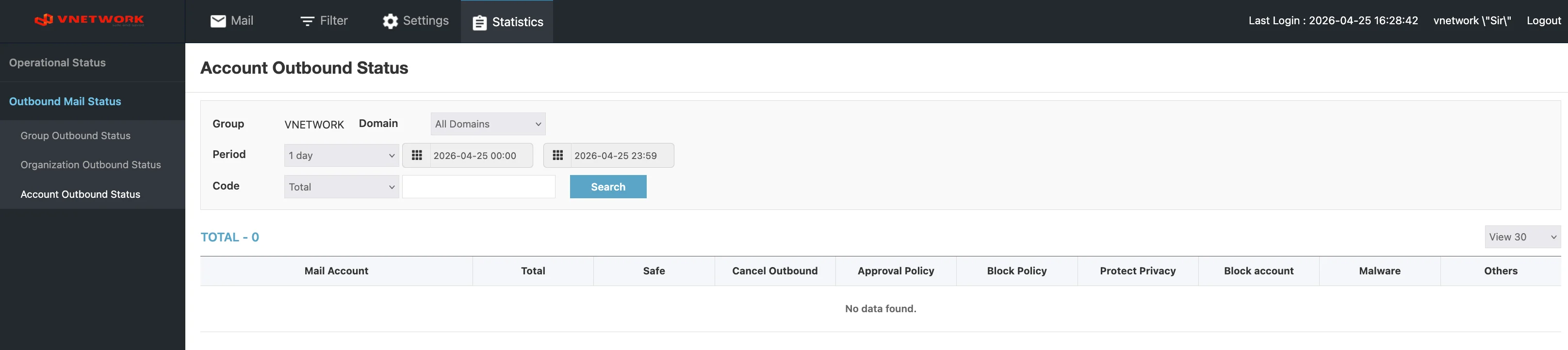
Page Layout
The page header reads Account Outbound Status.
Filters
| Field | Purpose |
|---|---|
| Group | Static label showing the current group (for example VNETWORK) |
| Domain | Dropdown (default All Domains) — narrow to a single domain |
| Period | Period preset (1 day, 1 week, 1 month, etc.) |
| Start datetime | Start of the reporting window |
| End datetime | End of the reporting window |
| Code | Dropdown (default Total) followed by a free-text input — narrow to a code or pattern within an account |
| Search (blue) | Apply the filters |
Columns
| Column | Description |
|---|---|
| Mail Account | Mail address of the account |
| Total | Total outbound messages from this account |
| Safe | Messages classified as Safe and delivered |
| Cancel Outbound | Messages cancelled |
| Approval Policy | Messages routed to approval and released |
| Block Policy | Messages blocked by an outbound block policy |
| Protect Privacy | Messages blocked or held by PII Protection |
| Block account | Messages blocked because the account was suspended |
| Malware | Messages blocked for malware |
| Others | Messages that did not match any of the above categories |
A pagination control sits at the bottom of the table and a View 30 dropdown on the right controls page size.
When to Use This Page
Use this page to investigate behavior at the individual user level:
- A user reports their mail is not arriving — confirm whether their
Block PolicyorBlock accountcount is non-zero - An automated account is flooding outbound — find it as the row with the largest
Total - An incident requires audit — produce a per-user breakdown for the affected window
The sum of every account's Total should match the corresponding Organization Total (after filtering to the same organization).
Combine the Code filter with a partial mail address to find a single account quickly when there are hundreds of pages of results.
Per-account counters are personally identifiable. Treat exports of this page as sensitive — do not share them outside the group of administrators authorised to investigate user behavior.